Losing something important can quickly turn an ordinary day into a stressful one. Keys disappear just when we are ready to leave, a backpack gets forgotten on public transportation, or luggage fails to arrive at the airport.
The Apple AirTag was created to make these situations a little easier to manage. This small tracking device helps people locate personal belongings through Apple’s Find My network. It cannot guarantee that every missing item will be recovered, but it can provide valuable location information and some much-needed peace of mind.
Apple introduced the second-generation AirTag in January 2026, improving its Precision Finding range, Bluetooth connectivity, and built-in speaker while keeping the familiar compact design of the original model.
What Is an Apple AirTag?
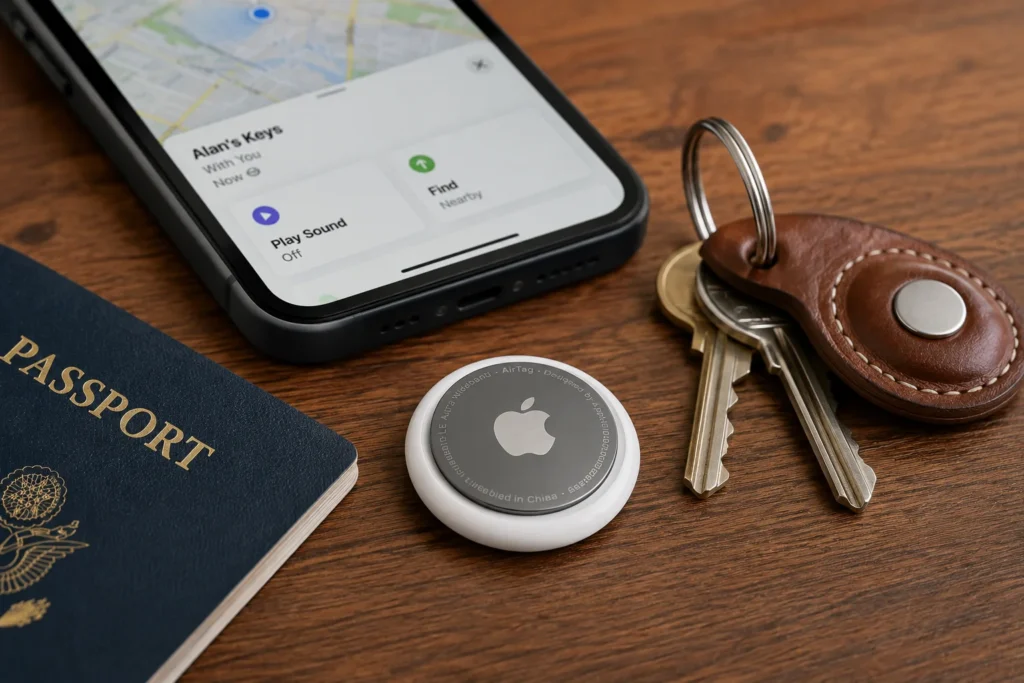
An Apple AirTag is a small, circular tracking device designed to be attached to or placed inside everyday objects.
People commonly use it with:
- Keys
- Wallets
- Backpacks
- Suitcases
- Camera bags
- Laptop cases
- Bicycles
- Musical instrument cases
Once it has been paired with an iPhone or iPad, the AirTag appears in the Items section of the Find My app. From there, the owner can view its most recently reported location, make it play a sound, activate Lost Mode, or use Precision Finding when the device is nearby.
The second-generation AirTag has a diameter of 1.26 inches, a thickness of 0.31 inches, and a weight of approximately 0.42 ounces. It maintains the same general size and shape as the original model, meaning older AirTag holders and accessories remain compatible.
However, the AirTag does not have a built-in keyring hole. Anyone who wants to attach it directly to a set of keys, a bag, or a collar will normally need a separate holder.
How Does Apple AirTag Work?
The Apple AirTag does not work like a traditional GPS tracker. It does not contain its own cellular connection, SIM card, or mobile data subscription.
Instead, it uses Bluetooth to communicate with nearby Apple devices.
When your AirTag is close to your iPhone, the two devices can communicate directly. You can make the tracker play a sound or use Precision Finding to receive visual and directional guidance.
When the AirTag is farther away, it can be detected by other compatible Apple devices that are part of the Find My network. Those devices anonymously and securely report the AirTag’s approximate location, allowing its owner to see an updated position in the Find My app.
The people whose devices help detect the AirTag are not shown information about the tracker or its owner. The process happens automatically in the background.
This network-based approach is one of the AirTag’s greatest strengths. Millions of Apple devices can potentially help locate a lost object without their owners having to take any action.
Is Apple AirTag a GPS Tracker?
Although people often describe the Apple AirTag as a GPS tracker, this is not technically accurate.
A traditional GPS tracker determines its position using satellites and usually sends that information through a cellular network. An AirTag mainly relies on Bluetooth, Ultra Wideband technology, and nearby devices connected to Apple’s Find My network.
This difference is important.
In a busy airport, train station, shopping center, or city, an AirTag may be detected frequently because many Apple devices are nearby. In a remote area with very few people or compatible devices, location updates may be slower or unavailable.
For this reason, an AirTag is excellent for locating misplaced belongings, but it should not be considered a replacement for a dedicated real-time GPS tracking system.
What Changed With the Second-Generation AirTag?
Apple’s second-generation AirTag focuses on improving the features people use most often rather than completely changing the product.
The new model includes:
- A second-generation Ultra Wideband chip
- Expanded Precision Finding connectivity
- A longer Bluetooth range
- A louder built-in speaker
- Precision Finding support on compatible Apple Watch models
- Improved use of recycled materials
According to Apple, the updated Precision Finding system can guide users from up to 50 percent farther away than the previous generation. The redesigned speaker is also 50 percent louder and can be heard from up to twice the previous distance under Apple’s testing conditions.
These improvements may sound modest, but they can make a meaningful difference when an AirTag is buried inside a suitcase, hidden under furniture, or left somewhere in a large room.
How Precision Finding Works
Precision Finding is one of the most useful Apple AirTag features.
When you are close enough to a compatible AirTag, the Find My app can show:
- The approximate distance to the item
- The direction in which you should move
- Visual arrows
- On-screen instructions
- Sound and vibration feedback
This is particularly helpful when you know an object is nearby but cannot see it.
For example, your keys may be underneath a pile of clothes, inside the wrong drawer, between the cushions of a sofa, or hidden at the bottom of a bag. Instead of searching the entire room, Precision Finding can guide you toward the AirTag.
Expanded Precision Finding on the second-generation model works with compatible iPhones, including iPhone 15 and later models, with some exceptions. Apple also supports Precision Finding through compatible Apple Watch models, including Apple Watch Series 9 or later and Apple Watch Ultra 2 or later with the required software. Availability can vary by country because Ultra Wideband technology is restricted in some regions.
Finding an AirTag With Sound
When an Apple AirTag is nearby, you can use the Find My app to make its built-in speaker play a sound.
This simple feature can be surprisingly useful. A visual map may tell you that the item is inside your home, but the sound helps you determine exactly where it is.
The louder speaker in the second-generation AirTag should make it easier to hear when the tracker is:
- Inside a backpack
- Under a bed or sofa
- Buried in a suitcase
- Behind furniture
- Inside a noisy room
Physical obstacles and background noise can still make the sound more difficult to hear. The best results normally come from combining the audible alert with Precision Finding.
Using Apple AirTag for Luggage
Travel is one of the situations where an Apple AirTag can feel especially reassuring.
Placing one inside a suitcase allows you to check whether your luggage appears to be nearby, has reached the correct airport, or may have remained behind during a connection.
AirTag cannot prevent an airline from losing or delaying your bag. However, it can provide additional information while you are waiting for an official update.
Apple’s Share Item Location feature also allows users to create a temporary webpage showing the location of a lost AirTag or another compatible Find My item. This link can be shared with another person or with a participating airline to help locate mishandled luggage.
Location sharing automatically stops when the item is recovered, when the owner manually disables the link, or after seven days.
An AirTag should still be considered an additional recovery tool. Travelers should always report lost luggage through the airline’s official system and keep important documents, medication, and valuable items in their carry-on luggage whenever possible.
Battery Life and Replacement
The Apple AirTag uses a standard CR2032 3V lithium coin-cell battery.
Unlike devices with permanently sealed batteries, AirTag allows the owner to replace the battery without sending the product to Apple or buying a completely new tracker.
When the battery becomes low, the Find My app displays a notification. Replacing it only requires pressing down on the stainless-steel cover, rotating it counterclockwise, removing the old battery, and inserting a compatible replacement.
Apple warns that some CR2032 batteries with bitterant coatings may not work correctly with AirTag. Buyers should look for packaging that specifically states that the battery is compatible with Apple AirTag.
Coin-cell batteries can also be dangerous if swallowed, so AirTags, loose batteries, and removable battery covers should always be kept away from small children.
Water and Dust Resistance
The second-generation Apple AirTag has an IP67 water- and dust-resistance rating.
Under controlled laboratory testing, this rating covers immersion in water at a maximum depth of one meter for up to 30 minutes. However, Apple explains that water and dust resistance are not permanent and may decrease through normal wear.
In practical terms, occasional rain or an accidental splash should not normally be a major concern. However, AirTag is not designed for prolonged underwater use, swimming, or diving.
A damaged AirTag should also be allowed to dry completely before its battery compartment is opened.
Apple AirTag Privacy and Security
Any device capable of reporting a location naturally creates privacy concerns.
Apple states that AirTag is designed specifically for tracking personal belongings rather than people. The company has introduced several protections intended to discourage secret or unwanted tracking.
Compatible iPhones, iPads, and Android devices can warn users when an unknown Bluetooth tracker appears to be moving with them over time. Apple and Google collaborated on an industry standard designed to make these unwanted-tracking alerts available across both major mobile platforms.
An AirTag separated from its owner may also make a sound after a period of time, helping people discover a tracker that may have been placed among their belongings.
Anyone who receives an unexpected tracking warning should take it seriously. The phone can provide instructions for locating the unknown tracker, playing a sound, viewing available information, and disabling it.
When personal safety may be at risk, the person should move to a safe location and contact local law enforcement. Apple states that law enforcement agencies can work with the company to request information connected to an AirTag during an investigation.
Can You Share an AirTag With Someone Else?
An Apple AirTag can be shared with other people through the Find My app.
This is useful for shared objects such as family car keys, luggage, bicycles, or equipment used by several people.
Apple currently allows the owner to share an AirTag with up to five additional people, creating a maximum group of six users for one item. The participants need compatible software, an Apple Account, two-factor authentication, iCloud, and iCloud Keychain.
People included in the sharing group can view the item’s location and use available finding features. They also avoid receiving unwanted-tracking warnings for an AirTag that they already know has been shared with them.
Can Apple AirTag Track Pets?
AirTag holders designed for pet collars are widely available, but Apple officially presents the AirTag as a tracker for objects rather than animals.
An AirTag attached to a collar may help locate a pet when compatible Apple devices are nearby. However, it does not provide the independent, continuous location updates of a dedicated GPS pet tracker with cellular connectivity.
This limitation becomes particularly important in rural areas, forests, or other places where few Apple devices may be available to detect the AirTag.
AirTag can offer an additional layer of reassurance, but it should not replace proper identification, a microchip, secure fencing, or a specialized pet-tracking device.
The Main Advantages of Apple AirTag
The Apple AirTag offers several practical benefits:
- Simple setup with an iPhone or iPad
- Deep integration with the Find My app
- Access to Apple’s extensive Find My network
- Precision Finding on supported devices
- A user-replaceable battery
- No monthly subscription
- Compact and lightweight construction
- Useful privacy and unwanted-tracking alerts
- Compatibility with many existing accessories
Once it has been configured, AirTag requires very little attention. It quietly remains attached to an object until the day it is actually needed.
The Main Limitations
AirTag is helpful, but it is important to understand what it cannot do.
It does not have:
- Independent GPS tracking
- Its own cellular connection
- Continuous real-time location updates
- A rechargeable battery
- A built-in keyring hole
- Full functionality with every smartphone
- Guaranteed coverage in remote areas
The second-generation model also requires an iPhone running iOS 26 or later, or a compatible iPad running iPadOS 26 or later, for setup and normal use.
People who primarily use Android devices may find trackers designed specifically for Google’s ecosystem more convenient.
Is Apple AirTag Worth Buying?
For people who already use an iPhone, the Apple AirTag remains one of the simplest ways to keep track of personal belongings.
It is particularly useful for travelers, commuters, students, photographers, musicians, and anyone who regularly carries important objects that could easily be misplaced.
The second-generation model improves the areas that matter most. Precision Finding works from farther away, the Bluetooth range has been expanded, the speaker is louder, and compatible Apple Watches can provide directional guidance. At the same time, the familiar design means existing accessories can continue to be used.
AirTag is not a perfect tracking solution, and it should not be treated as a professional GPS device. Its effectiveness still depends partly on nearby Apple devices and the coverage of the Find My network.
Even with these limitations, it solves a very human problem in a simple and thoughtful way.
Losing something important can make us feel anxious and powerless. Apple AirTag cannot eliminate that possibility, but it can give us a better chance of recovering the objects that matter and sometimes, that extra reassurance is exactly what we need.