For a long time, browsers were pretty simple tools. You opened Chrome, Edge, Firefox or another browser, typed something into the search bar, visited a website and moved between tabs on your own.
Today, things are changing. Browsers are no longer just windows to the internet. With artificial intelligence, they are starting to act more like personal assistants: they can summarize pages, help with searches, write texts, organize information and even understand what you are doing online.
This is especially clear with browsers like Chrome and Microsoft Edge, but the same trend is also appearing in Opera, Brave and newer AI-focused browsers.
Automatic summaries: saving time while browsing
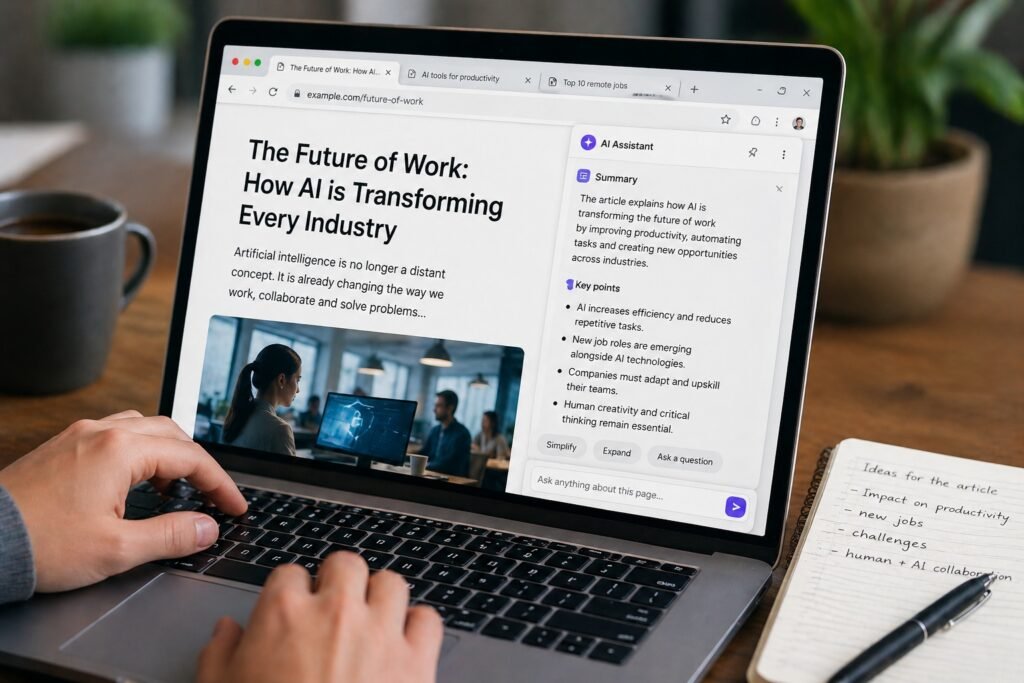
One of the most useful AI features in browsers is automatic summarization.
Imagine opening a long article, a complicated document or a technical page full of information. Instead of reading everything from start to finish, you can ask the browser to summarize it for you. In a few seconds, the AI can give you the main points and help you understand whether that page is useful or not.
This can be very helpful for students, workers, journalists or anyone who spends a lot of time researching online. It saves time and makes information easier to manage.
However, there is also a small risk. AI summaries are useful, but they are not always perfect. Sometimes they can miss important details, simplify too much or misunderstand part of the text. For this reason, they should be seen as a quick help, not as a complete replacement for reading the original source.
Assisted search: from keywords to conversation
Searching online is also becoming different.
In the past, we used to type a few keywords, open many websites and compare the results by ourselves. Now, AI can make the search experience more conversational. Instead of searching only with short words, users can ask full questions, request explanations or ask the browser to compare information from different pages.
This makes the browser feel much more like a real assistant. It does not just show links anymore; it tries to understand what the user needs and gives a more direct answer.
This is very convenient, but it also changes the way we use the web. If the browser gives us a ready-made answer, we may visit fewer websites and check fewer sources. That can be useful, but it also means we need to be careful and not trust every AI-generated answer without thinking.
Writing help: emails, forms and quick texts
Another important feature is AI writing assistance.
Browsers can now help users write emails, complete forms, improve sentences, correct grammar or create short texts directly inside a webpage. This is useful because the AI is available exactly where the user needs it.
For example, if you are writing an email, you can ask the AI to make it more professional. If you are filling in a description, it can help you make it clearer. If you are replying to someone, it can suggest a better tone.
This makes everyday online tasks faster and easier. The browser becomes less passive and more active, almost like a small helper always ready to give a hand.
Privacy: the most delicate issue
The biggest question is privacy.
For an AI browser assistant to be useful, it often needs access to what the user is doing. It may need to read the page that is open, understand the content of a document, look at the active tab or use information from the browsing session.
This is where things become more sensitive.
On one hand, more context means better answers. On the other hand, more context also means more personal data could be involved. A browser knows a lot about us: what we search, what we read, what we write, what we buy and which websites we visit.
For this reason, companies need to be very clear about how data is used. Users should know when the AI is reading a page, what information is being sent to servers, whether conversations are stored and whether the data is used to train AI models.
A good AI browser should not only be smart. It should also be transparent and respectful of the user’s privacy.
Not everyone wants AI everywhere
It is also important to remember that not all users want AI inside their browser.
Some people love the idea of having a smart assistant that can summarize, write and search for them. Others prefer a simpler browser, focused on speed, privacy and control.
This is why choice is very important. AI features should be useful, but they should not feel forced. Users should be able to turn them on, turn them off and decide how much access the assistant has.
The future of browsers will probably not be the same for everyone. Some browsers will become very AI-focused, while others may continue to offer a more traditional and private experience.
Conclusion
So, are Chrome, Edge and other browsers becoming personal assistants?
Yes, absolutely.
Browsers are no longer just tools for opening websites. They are becoming smarter, more interactive and more helpful. They can summarize information, assist with searches, help users write and make online tasks faster.
This can make the internet easier to use, especially when there is too much information to handle. But at the same time, it raises important questions about privacy, data and user control.
The browser of the future could be much more useful than the one we know today. But it must also be clear, honest and respectful. Because when a browser can read what we see, help with what we write and understand what we search, it is no longer just a browser.
It becomes part of our digital life.